

VariQuest Tools: Perfecta 2400STP | VariQuest Tools: Perfecta 3600STP | visual learning | VariQuest Tools: Perfecta 2400PRO
Visual aids are effective tools teachers can use in the classroom to enhance student interest, comprehension, and retention of information and concepts. The hard part is finding time to make ones that actually earn their wall space.
This guide covers what visual aids are, why they work, which types to use for which goals, and how schools make them in-house without losing every prep period.
Key takeaways
- Visual aids for learning are images, graphics, or physical objects that help students understand and remember a concept.
- Pairing visuals with spoken explanation helps nearly all students, not just "visual learners."
- The best visual aid matches your lesson goal, and in-house tools cut the time it takes to make one.
What is a visual aid for learning?
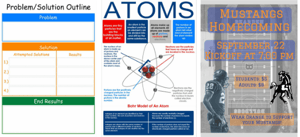
A visual aid for learning is any instructional material that uses images, graphics, or physical objects to help students understand and remember a concept. Visual aids help teachers establish, explain, connect, and associate ideas and concepts to make the process of learning more interesting, enjoyable, and effective.
In K-12 classrooms, that goes well beyond slides: anchor charts, number lines, picture schedules, sensory paths, and manipulatives all count. The test of a good one is simple: does it make the concept clearer, not just the room more colorful?
Why are visual aids important? What the research actually says
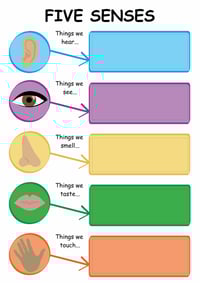
Education organizations that translate learning research for teachers point to a few consistent findings:
- Words and pictures together beat words alone. The Learning Scientists explain that dual coding, or combining words with visuals, gives students two ways to remember the same idea. Narrate a visual as you introduce it.
- Math understanding is visual. Stanford's YouCubed team explains that visual math improves performance, so diagrams and visual models belong in math lessons at every grade.
- Hands-on materials help when they're guided. In American Educator, cognitive scientist Daniel Willingham notes that manipulatives work best when teachers point students to the concept the object represents.
- Movement helps vocabulary stick. Edutopia profiles a teacher whose students remember new words longer when they act them out.
- Visuals open up content for English learners. Colorín Colorado's guide to using visuals shows how visuals make grade-level content comprehensible without lowering rigor.
- Analogies bridge the familiar and the new. The National Science Teaching Association's Teaching-With-Analogies model connects new concepts to things students already know.
The takeaway isn't that some students are "visual learners." Matching instruction to learning styles doesn't improve learning, but pairing words and visuals helps everyone. VariQuest builds its Learning Suite on this research behind visual and kinesthetic learning.
What this looks like in the classroom
Some of the benefits visual aids provide for teaching and learning include:
- Helping students retain information for a longer period of time
- Providing an example to think about concepts
- Increasing the student's vocabulary
- Helping students gain a proper view of topics and concepts
- Providing hands on experience for students
- Creating an atmosphere of interest
The main types of visual aids in teaching
Each type of visual aid does a different job. You'll find ready-made examples of each in VariQuest's classroom resources for teachers.
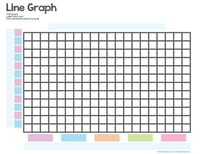
- Static displays: Anchor charts, posters, word walls, and bulletin boards keep key information in front of students for a whole unit. Educational charts are another effective visual aid for learning, especially for helping students make sense of data.
- Reference and fluency visuals: Flash cards, number lines, and mnemonic displays give students a model to return to as they build fluency.
- Communication and routine visuals: Picture schedules, choice boards, and emotion charts help students who are still building language follow routines and express themselves.
- Manipulatives: Lacing cards, puzzles, game boards, and buildable models (like the water cycle) let students assemble ideas instead of just observing them.
- Movement-based visuals: Printable sensory paths and brain break cards pair physical movement with content.
- Digital visuals: Slides, diagrams, and short videos are great for demonstration, but they disappear when the lesson ends.
- Student-created visuals: Concept maps and graphic organizers turn a visual into something students think through, not just look at.
Choosing the right visual aid for your goal
You don't need every type of visual aid. Pick the one or two that match this week's lesson:
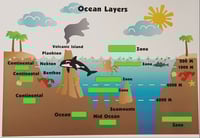
- Teaching a multi-step process? Build a permanent anchor chart students can use while they practice.
- Building fluency (math facts, sight words, vocabulary)? Use flash cards, number lines, or mnemonic displays students see often.
- Explaining a cycle or system? Have students build a manipulative so they reason through the order themselves.
- Working through a language barrier? Use picture supports and games that pair an image and a gesture with each word.
- Resetting attention? Try sensory paths or brain break cards.
- Reaching the whole building? Print at poster scale for hallways and common areas using poster printers for schools.
A quick filter: the visual matches your objective, every student can see or reach it, and you can make it before the lesson starts.
Examples of visual aids in the classroom by grade level and program area
- Early education: Alphabet and number displays, picture routines, sorting cards, and counting manipulatives.
- Special education: Picture schedules, first-then boards, regulation visuals, and communication boards. Explore more special education resources.
- ELL and world languages: Labeled classrooms, dual-language reference cards, and vocabulary games that pair images with gestures.
- Math: Number lines, fraction manipulatives, and place value charts that build number sense.
- STEM: Buildable models, lab process anchor charts, and data visualization references. Browse VariQuest's STEM education resources.
- CTE: Safety process posters, certification pathway displays, and program bulletin boards.
- SEL: Feelings charts, conflict resolution steps, and classroom agreements, like this first day of school feelings anchor chart and lesson plan.
Download some free VariQuest visual aid posters here:
- Calm Down Checklist Poster
- My Holiday Traditions Poster
- Digital Citizenship and Internet Safety Poster Pack
Best practices for using visual aids effectively
- Keep it to one idea. Cluttered charts compete with themselves.
- Tie it to your objective. Skip visuals that look nice but pull focus.
- Introduce it out loud. Narrating a visual is what makes it stick.
- Point back to it. A chart students use during practice becomes a tool, not wallpaper.
- Make it accessible. Place it where everyone can see or reach it, or offer a desk-sized copy.
- Rotate and reuse. Swap displays by unit, and laminate anything you'll use again.
How the VariQuest Learning Suite helps teachers create visual aids in-house
At VariQuest, we offer tools to help students and teachers achieve greater results in the classroom, such as machines that create vibrant visual aid posters. Our visual learning tools for schools bring design, printing, cutting, and laminating in-house, so teachers can create what they need without an outside vendor or design experience:
- Start from a template, not a blank page. The Engage Every Learner® Content library includes more than 25,000 education-specific templates, graphics, fonts, and cutouts, created for educators by educators.
- Design in minutes. VariQuest's design software for schools, including the cloud-based StudioVQ™, is built for teachers, not graphic designers.
- Print big. The Perfecta® Poster Design System prints anchor charts and hallway displays at a size students can read from across the room.
- Cut hands-on materials fast. The Cutout Maker digital die-cut machine for schools produces letters, shapes, sensory path pieces, and manipulatives in a fraction of the time hand-cutting takes.
- Make cards and awards. The Motiva® specialty printer for schools prints flash cards, brain break cards, and recognition awards.
- Make it last. A cold laminator for schools protects materials so they can be reused year after year.
The Learning Suite holds the Digital Promise Research-Based Design: ESSA Tier 4 Product Certification (December 2025) and is backed by professional development and support from a team that includes former educators.
The VariQuest Visual and Kinesthetic Learning Suite is paired with thousands of templates, graphics, fonts, cutouts, and collections in our Engage Every Learner® Content, and because we're also visual learners, we'd like to show you! Request a demo to see the Learning Suite in action and find the right fit for your classroom, school, or district.

Frequently asked questions about visual aids for learning
What are good visual aids for demo teaching?
Choose one or two visual aids that make your lesson objective visible within the first few minutes. An anchor chart you build with students in real time shows the observer how you model thinking, not just what you prepared.
A short set of manipulatives or picture cards shows how you'll get every student involved, including English learners. Keep each visual uncluttered and large enough to read from the back of the room. Point back to it during practice so it works as a tool rather than decoration. Practice using it once before the lesson so it doesn't slow you down.
What are examples of teaching aids?
Teaching aids are any materials that help students understand or practice what's being taught. Common examples include:
- Visual displays: anchor charts, posters, word walls, and number lines that stay up for a unit.
- Hands-on materials: counters, fraction pieces, puzzles, and buildable models that students physically arrange.
- Reference cards: flash cards, picture schedules, and vocabulary cards students use on their own.
- Movement-based aids: sensory paths and brain break cards that pair activity with content.
- Digital aids: slides, diagrams, and short videos for demonstrating a concept.
The best choice depends on the lesson goal. A multi-step process calls for a chart students can follow, and a cycle or system calls for a model they can build.
What is the purpose of visual aids in teaching?
Visual aids give students a second way to take in an idea besides the teacher's spoken explanation. The Learning Scientists describe this as dual coding: when words and visuals are combined, students have two ways to remember the same concept.
Visual aids also keep key information in front of students during independent practice, so they don't have to hold every step in memory. They make grade-level content more accessible for English learners, too. Their purpose is to make a concept clearer, not just to make a room more colorful, so every visual should connect directly to what students are learning.
What are some visual aid ideas for the classroom?
The most useful visual aids are ones students use during practice, not just look at. A few ideas that work across grade levels:
- Build-along anchor charts that capture each step as you model a process.
- Number lines and place value charts posted at student eye level for math.
- Word walls with an image next to each new vocabulary word.
- Picture schedules and first-then boards that help students follow routines.
- Sorting cards and puzzles students arrange to show what they know.
- A hallway sensory path that pairs movement with letters, numbers, or math facts.
Rotate displays by unit so your walls reflect what students are learning right now.
How do you make a visual aid poster?
- Start with one idea. A single process, vocabulary set, or concept per poster keeps it readable.
- Write large, simple text. Students should be able to read it from the back of the room.
- Pair each key word with an image or icon. This helps students who are still building reading or English skills.
- Leave white space so the eye knows where to go.
- Print at poster scale and laminate it if you'll reuse it.
Starting from an education-specific template saves most of the design time. VariQuest's StudioVQ™ includes Engage Every Learner® templates that teachers can customize and print on the Perfecta® Poster Design System in the same day.